---
title: "GitHub Projects"
description: "Work with GitHub Projects v2 boards, tables, fields, drafts, status updates, and project items from Desk."
---
Desk includes a GitHub Projects v2 subsystem for planning work beside agents, terminals, code, Git, notes, and channels.
The subsystem uses the GitHub CLI:
- `gh api graphql` for Projects v2 queries and mutations
- `gh issue` and `gh pr` for issue and pull request operations
Desk does not store a separate GitHub token.
## Authentication
Authenticate the GitHub CLI first:
```bash
gh auth login
```
Projects v2 requires the `project` scope:
```bash
gh auth refresh -s project
```
When the token is missing that scope, Desk returns a scope-specific error and the UI can prompt you to refresh auth.
## Project picker
Desk lists projects visible to the authenticated account:
- viewer-owned projects
- organization projects visible to the viewer
The active project determines the board, table, fields, views, and item drawer content.
## Loading limits
Desk pages through project items and stops fetching after the first 1000 — a Desk-side loading cap, not a GitHub limit; the project itself can hold more. If a board is truncated this way, the UI shows a truncated state so you know it is not complete.
Use filters, saved views, or GitHub itself for very large project audits.
## Board view
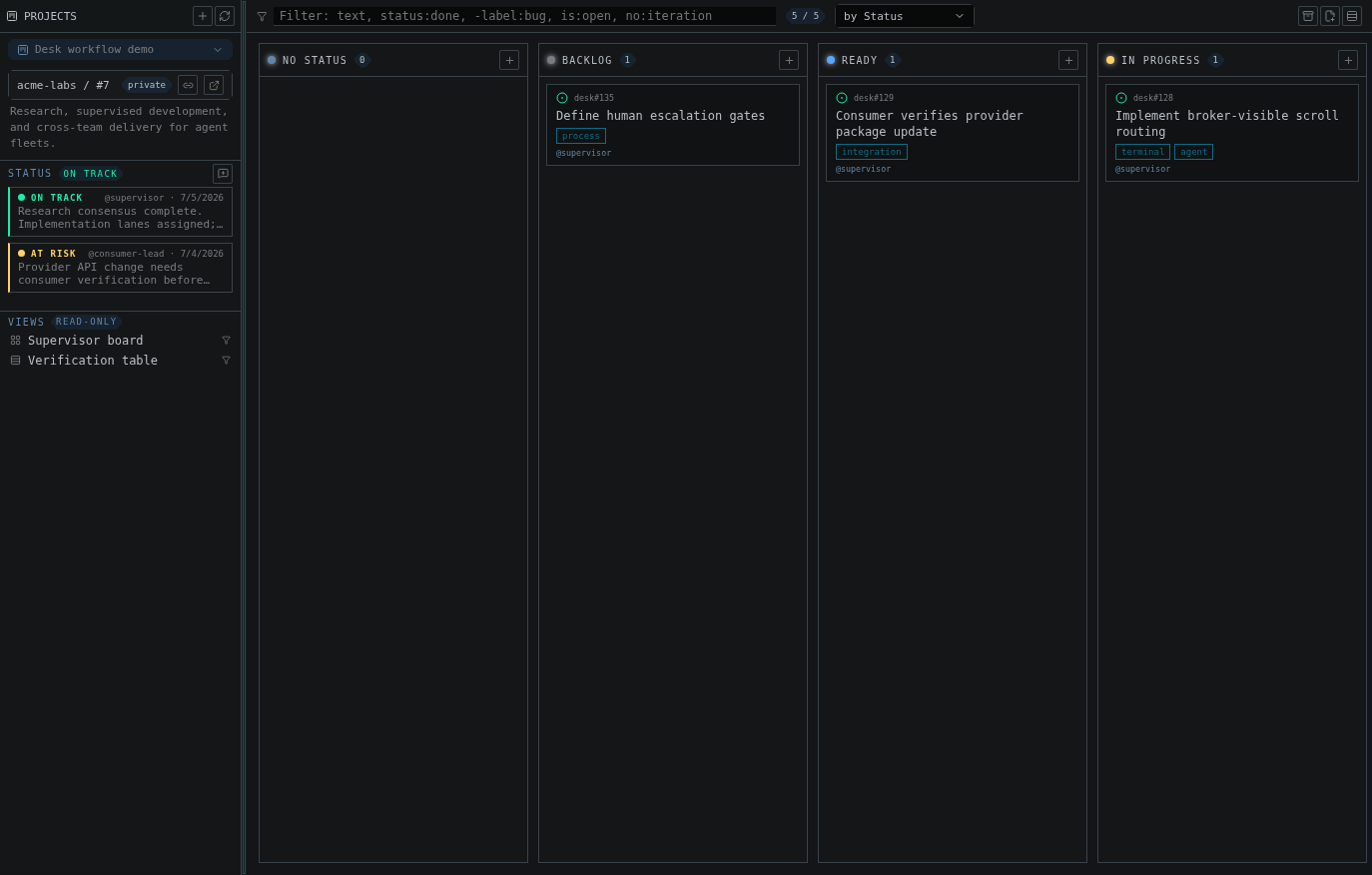
The board groups items by a single-select or iteration field. Items without a
value collect in a leading "No Status"-style column named after that field,
which is hidden while empty (the same way GitHub hides it under a `-no:status`
filter).
You can:
- switch the group-by field
- drag cards between columns
- reorder cards within a column
- show or hide archived items
- open an item drawer
- use saved GitHub view chips when the project exposes them
For iteration fields, Desk includes the active iteration and recent completed iterations.
## Table view
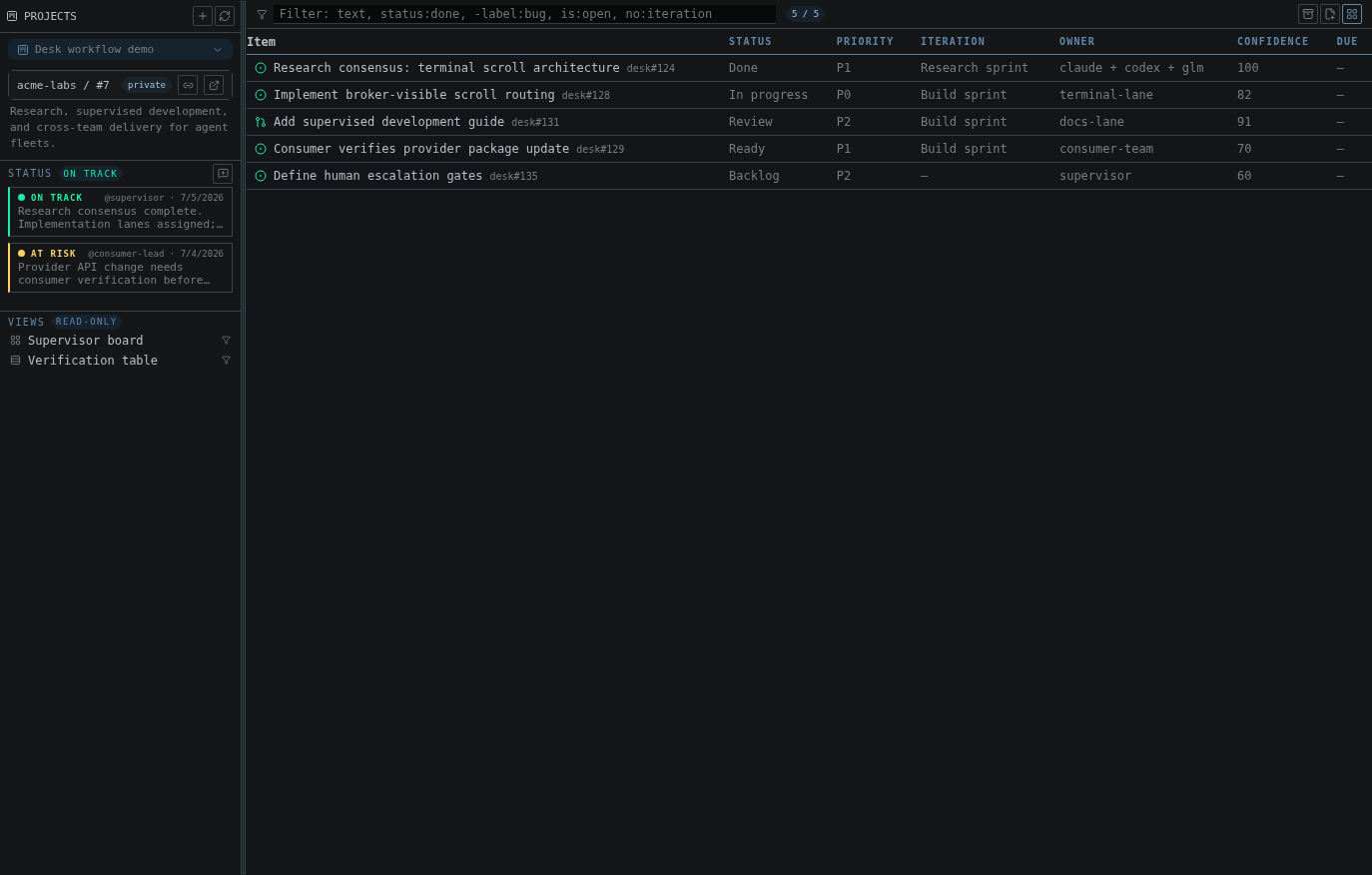
The table view gives a dense list with sortable columns and inline field editing.
Supported field edits include:
- text
- number
- date
- single-select
- iteration
- clearing a field value
Desk sends field changes through GitHub Projects GraphQL mutations.
## Filters
The filter bar supports free text and structured filters:
```text
status:done -label:bug is:open no:iteration "release blocker"
```
Supported patterns include:
- `is:issue`, `is:pr`, `is:draft`
- `is:open`, `is:closed`, `is:merged`, `is:archived`
- `assignee:`, including `assignee:@me` for the signed-in account
- `label:
 The subsystem uses the GitHub CLI:
- `gh api graphql` for Projects v2 queries and mutations
- `gh issue` and `gh pr` for issue and pull request operations
Desk does not store a separate GitHub token.
## Authentication
Authenticate the GitHub CLI first:
```bash
gh auth login
```
Projects v2 requires the `project` scope:
```bash
gh auth refresh -s project
```
When the token is missing that scope, Desk returns a scope-specific error and the UI can prompt you to refresh auth.
## Project picker
Desk lists projects visible to the authenticated account:
- viewer-owned projects
- organization projects visible to the viewer
The active project determines the board, table, fields, views, and item drawer content.
## Loading limits
Desk pages through project items and stops fetching after the first 1000 — a Desk-side loading cap, not a GitHub limit; the project itself can hold more. If a board is truncated this way, the UI shows a truncated state so you know it is not complete.
Use filters, saved views, or GitHub itself for very large project audits.
## Board view
The board groups items by a single-select or iteration field. Items without a
value collect in a leading "No Status"-style column named after that field,
which is hidden while empty (the same way GitHub hides it under a `-no:status`
filter).
You can:
- switch the group-by field
- drag cards between columns
- reorder cards within a column
- show or hide archived items
- open an item drawer
- use saved GitHub view chips when the project exposes them
For iteration fields, Desk includes the active iteration and recent completed iterations.
## Table view
The table view gives a dense list with sortable columns and inline field editing.
The subsystem uses the GitHub CLI:
- `gh api graphql` for Projects v2 queries and mutations
- `gh issue` and `gh pr` for issue and pull request operations
Desk does not store a separate GitHub token.
## Authentication
Authenticate the GitHub CLI first:
```bash
gh auth login
```
Projects v2 requires the `project` scope:
```bash
gh auth refresh -s project
```
When the token is missing that scope, Desk returns a scope-specific error and the UI can prompt you to refresh auth.
## Project picker
Desk lists projects visible to the authenticated account:
- viewer-owned projects
- organization projects visible to the viewer
The active project determines the board, table, fields, views, and item drawer content.
## Loading limits
Desk pages through project items and stops fetching after the first 1000 — a Desk-side loading cap, not a GitHub limit; the project itself can hold more. If a board is truncated this way, the UI shows a truncated state so you know it is not complete.
Use filters, saved views, or GitHub itself for very large project audits.
## Board view
The board groups items by a single-select or iteration field. Items without a
value collect in a leading "No Status"-style column named after that field,
which is hidden while empty (the same way GitHub hides it under a `-no:status`
filter).
You can:
- switch the group-by field
- drag cards between columns
- reorder cards within a column
- show or hide archived items
- open an item drawer
- use saved GitHub view chips when the project exposes them
For iteration fields, Desk includes the active iteration and recent completed iterations.
## Table view
The table view gives a dense list with sortable columns and inline field editing.
 Supported field edits include:
- text
- number
- date
- single-select
- iteration
- clearing a field value
Desk sends field changes through GitHub Projects GraphQL mutations.
## Filters
The filter bar supports free text and structured filters:
```text
status:done -label:bug is:open no:iteration "release blocker"
```
Supported patterns include:
- `is:issue`, `is:pr`, `is:draft`
- `is:open`, `is:closed`, `is:merged`, `is:archived`
- `assignee:
Supported field edits include:
- text
- number
- date
- single-select
- iteration
- clearing a field value
Desk sends field changes through GitHub Projects GraphQL mutations.
## Filters
The filter bar supports free text and structured filters:
```text
status:done -label:bug is:open no:iteration "release blocker"
```
Supported patterns include:
- `is:issue`, `is:pr`, `is:draft`
- `is:open`, `is:closed`, `is:merged`, `is:archived`
- `assignee: