---
title: "Review agent work with git"
sidebarTitle: "Git review"
description: "The review loop for agent-produced changes: diffs, history, branch compare without checkout, and committing."
---
Agents produce branches and working-tree changes; the operator reviews them
before anything merges. The source-control rail is that review surface.
## See what changed
Select the repository (the picker scans under the editor root and remembers
recents). The Changes panel groups staged, unstaged, untracked, and
conflicted files — click any file for a side-by-side Monaco diff:
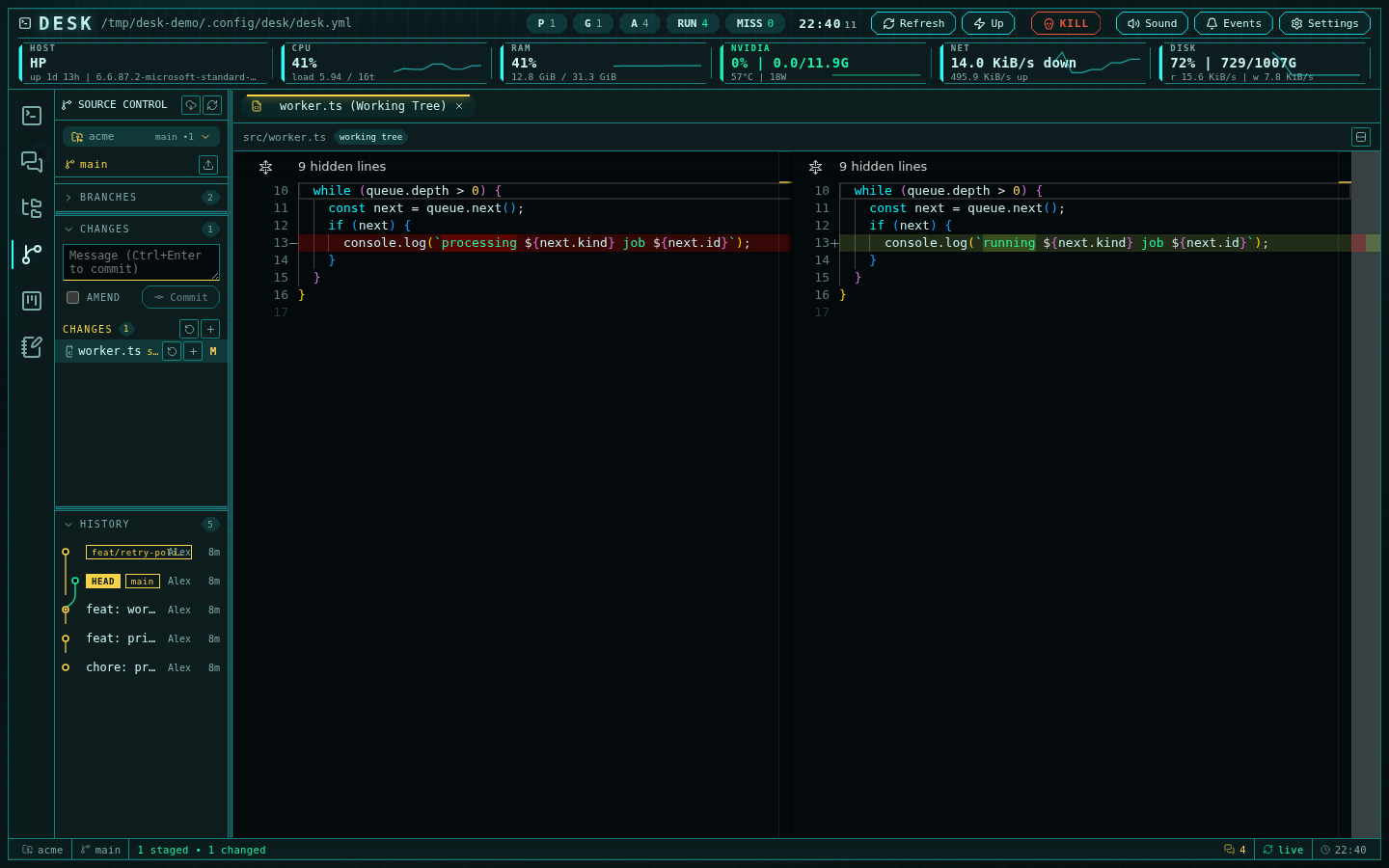 Stage, unstage, and discard per file or per group (discard confirms — it
deletes untracked files). The diff toolbar flips between side-by-side and
inline.
## Review a branch without touching your worktree
An agent worked on `feat/retry-policy`? Expand **Branches** and use
**Compare** on the branch row: Desk computes the merge base and lists every
file the branch changes, opening each as a read-only range diff — your
working tree never moves. This is the fastest honest answer to "what did the
agent actually do on that branch".
Checkout, create-from, and delete live on the same rows; remote branches
check out as tracking branches. Worktrees list alongside — open any worktree
as the active repository with one click.
## Walk the history
The History panel draws a lane-colored commit graph with branch, tag, and
HEAD markers. Expand a commit to see its files and open per-file diffs. The
context menu checks out or reverts a commit, creates a branch at it, copies
the SHA, or opens it on GitHub.
Per-file history (from the editor's context menu) follows renames.
## Commit and sync
Write the message in the commit box (`Ctrl+Enter` commits; `amend` with an
empty message keeps the previous one). If nothing is staged, Desk offers to
commit all tracked changes. Then **Push** — or **Publish** if the branch has
no upstream yet. **Pull** is fast-forward-only, so a diverged branch never
silently merges.
Every mutation refreshes the editor's git decorations immediately — badges,
directory dots, and gutter marks stay truthful across subsystems.
## Review checklist for agent branches
1. **Compare** the branch against the merge base — full file list, no
checkout.
2. Open the diffs that matter; check the tests the agent claims it added.
3. Walk history for surprise commits (the graph shows everything, not just
the branch tip).
4. Merge through your normal flow — Desk shows GitHub PR context for the
current branch when `gh` is authenticated.
The full feature reference is in [Git and GitHub operations](/github-operations).
Stage, unstage, and discard per file or per group (discard confirms — it
deletes untracked files). The diff toolbar flips between side-by-side and
inline.
## Review a branch without touching your worktree
An agent worked on `feat/retry-policy`? Expand **Branches** and use
**Compare** on the branch row: Desk computes the merge base and lists every
file the branch changes, opening each as a read-only range diff — your
working tree never moves. This is the fastest honest answer to "what did the
agent actually do on that branch".
Checkout, create-from, and delete live on the same rows; remote branches
check out as tracking branches. Worktrees list alongside — open any worktree
as the active repository with one click.
## Walk the history
The History panel draws a lane-colored commit graph with branch, tag, and
HEAD markers. Expand a commit to see its files and open per-file diffs. The
context menu checks out or reverts a commit, creates a branch at it, copies
the SHA, or opens it on GitHub.
Per-file history (from the editor's context menu) follows renames.
## Commit and sync
Write the message in the commit box (`Ctrl+Enter` commits; `amend` with an
empty message keeps the previous one). If nothing is staged, Desk offers to
commit all tracked changes. Then **Push** — or **Publish** if the branch has
no upstream yet. **Pull** is fast-forward-only, so a diverged branch never
silently merges.
Every mutation refreshes the editor's git decorations immediately — badges,
directory dots, and gutter marks stay truthful across subsystems.
## Review checklist for agent branches
1. **Compare** the branch against the merge base — full file list, no
checkout.
2. Open the diffs that matter; check the tests the agent claims it added.
3. Walk history for surprise commits (the graph shows everything, not just
the branch tip).
4. Merge through your normal flow — Desk shows GitHub PR context for the
current branch when `gh` is authenticated.
The full feature reference is in [Git and GitHub operations](/github-operations).