---
title: "Multi-agent layouts"
sidebarTitle: "Layouts"
description: "Choose and tune cell layouts for groups of agents: grids, linear lanes, custom cells, splits, and the mobile pager."
---
Every group renders its sessions in a grid of cells — agent chats and terminals — and the right layout
depends on what the group is for. This guide walks through each kind with the
workspace from [Set up a multi-agent workspace](/guide-create-agent-fleet).
## Fixed grids: 1x1 to 4x4
Grids suit working sets where every agent deserves equal space. `2x2` is the
sweet spot for four agents on a laptop screen; `3x3` and `4x4` scale to big
monitors and larger fleets. `1x1` gives one agent the whole surface — useful
for a session you are actively pairing with.
## Linear: agents in one row
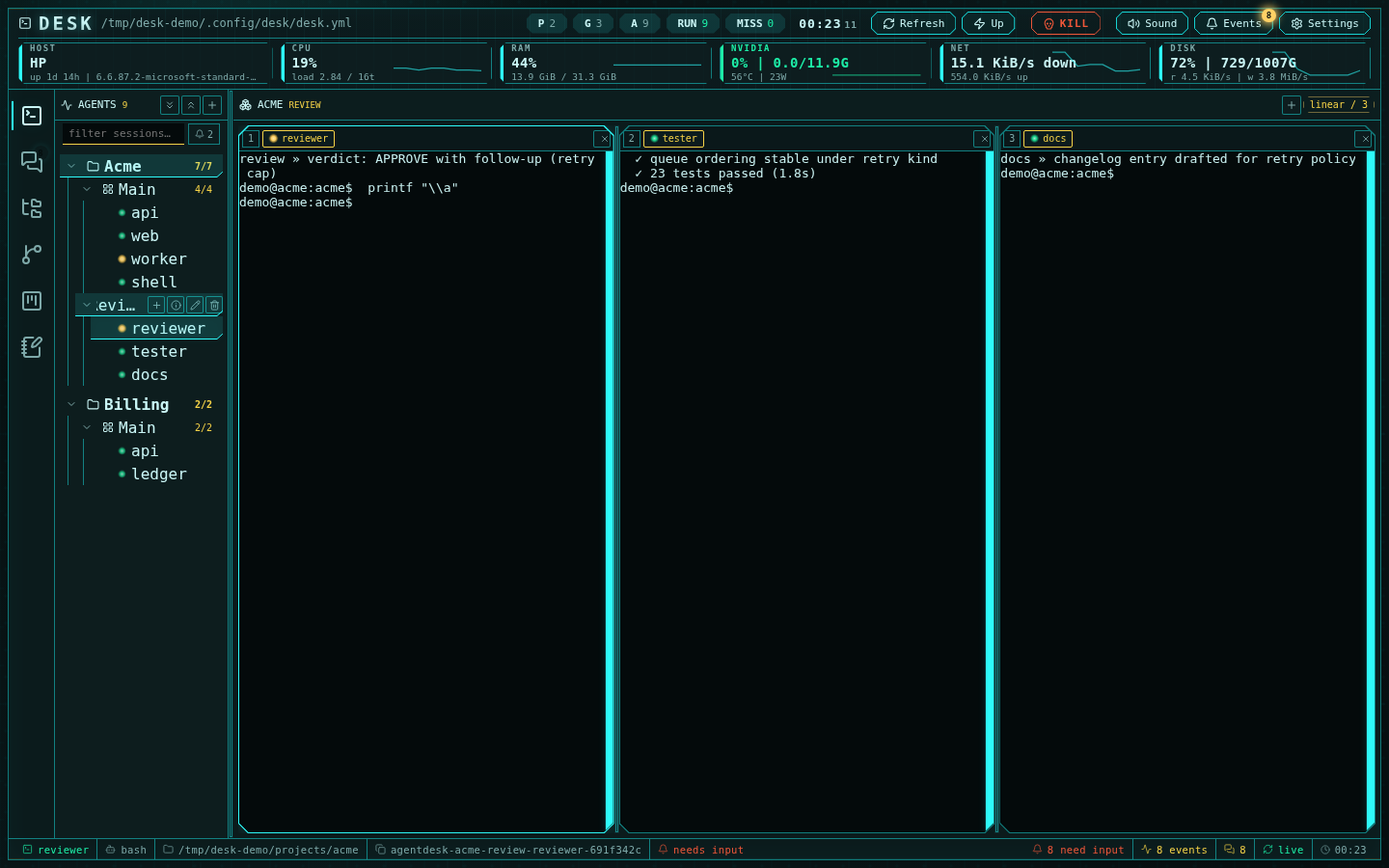
`linear` packs every cell into a single row — three side-by-side reviewers,
a pipeline of build/test/docs agents, or any lane you read left to right:
 ## Custom: exact cell counts
`custom` takes any cell count from 1 to 16 and packs them into a near-square
grid. Use it when the fixed kinds waste space — five agents, seven agents —
or grow it live with the **+** cell button.
## Tuning a layout live
- **Switch kinds in place** — the layout badge in the multiplexer header is a
dropdown; changing it never restarts sessions.
- **Resize the splits** — drag the separators between cells. The proportions
persist per group and restore exactly after a reload.
- **Assign sessions to cells** — drag a session tab onto a cell, or tap an
empty cell to pick a session from an inline picker. Assignments stick.
- **Remove a cell** — the ✕ on the cell tab strip; orphaned sessions fall
back to the first cell rather than disappearing.
## Group switching is free
Recently visited groups stay mounted with live cells under a warm budget
(about 40 sessions on desktop), so flipping between your `main` grid and a
`review` lane opens no new connections and repaints instantly. Transcript and terminal
state, scroll position, and selection survive the round trip.
## On phones: the pager
Below 860 px each cell takes the whole screen and you swipe between them.
The pager diamonds are state-tinted — the active cell expands into a named
pill, and a pulsing diamond means that agent needs input, so triage works
from the pager alone:
## Custom: exact cell counts
`custom` takes any cell count from 1 to 16 and packs them into a near-square
grid. Use it when the fixed kinds waste space — five agents, seven agents —
or grow it live with the **+** cell button.
## Tuning a layout live
- **Switch kinds in place** — the layout badge in the multiplexer header is a
dropdown; changing it never restarts sessions.
- **Resize the splits** — drag the separators between cells. The proportions
persist per group and restore exactly after a reload.
- **Assign sessions to cells** — drag a session tab onto a cell, or tap an
empty cell to pick a session from an inline picker. Assignments stick.
- **Remove a cell** — the ✕ on the cell tab strip; orphaned sessions fall
back to the first cell rather than disappearing.
## Group switching is free
Recently visited groups stay mounted with live cells under a warm budget
(about 40 sessions on desktop), so flipping between your `main` grid and a
`review` lane opens no new connections and repaints instantly. Transcript and terminal
state, scroll position, and selection survive the round trip.
## On phones: the pager
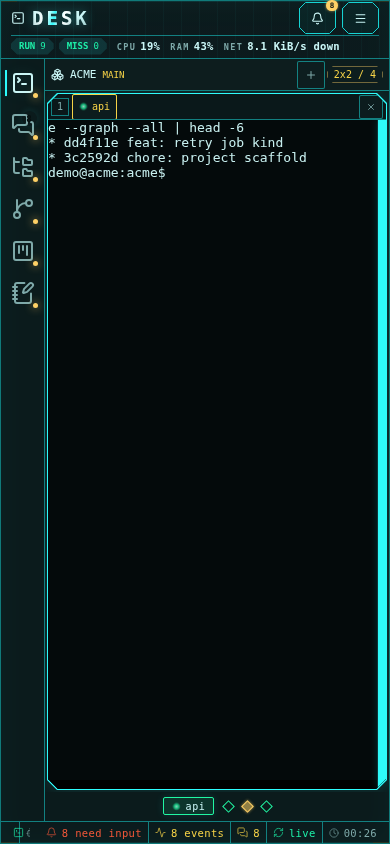
Below 860 px each cell takes the whole screen and you swipe between them.
The pager diamonds are state-tinted — the active cell expands into a named
pill, and a pulsing diamond means that agent needs input, so triage works
from the pager alone:
 ## Choosing by scenario
| Scenario | Layout |
| --- | --- |
| Four agents on one feature | `2x2` |
| Review lane (reviewer, tester, docs) | `linear` × 3 |
| One agent you are pairing with | `1x1` |
| Big monitor, whole-team view | `3x3` / `4x4` |
| Five to sixteen agents, odd counts | `custom` |
Next: [put the group in a channel](/guide-channels-collaboration) so the
agents coordinate with each other instead of through you.
## Choosing by scenario
| Scenario | Layout |
| --- | --- |
| Four agents on one feature | `2x2` |
| Review lane (reviewer, tester, docs) | `linear` × 3 |
| One agent you are pairing with | `1x1` |
| Big monitor, whole-team view | `3x3` / `4x4` |
| Five to sixteen agents, odd counts | `custom` |
Next: [put the group in a channel](/guide-channels-collaboration) so the
agents coordinate with each other instead of through you.