---
title: "Desk"
sidebarTitle: "Overview"
description: "Local mission control for coding-agent fleets."
---
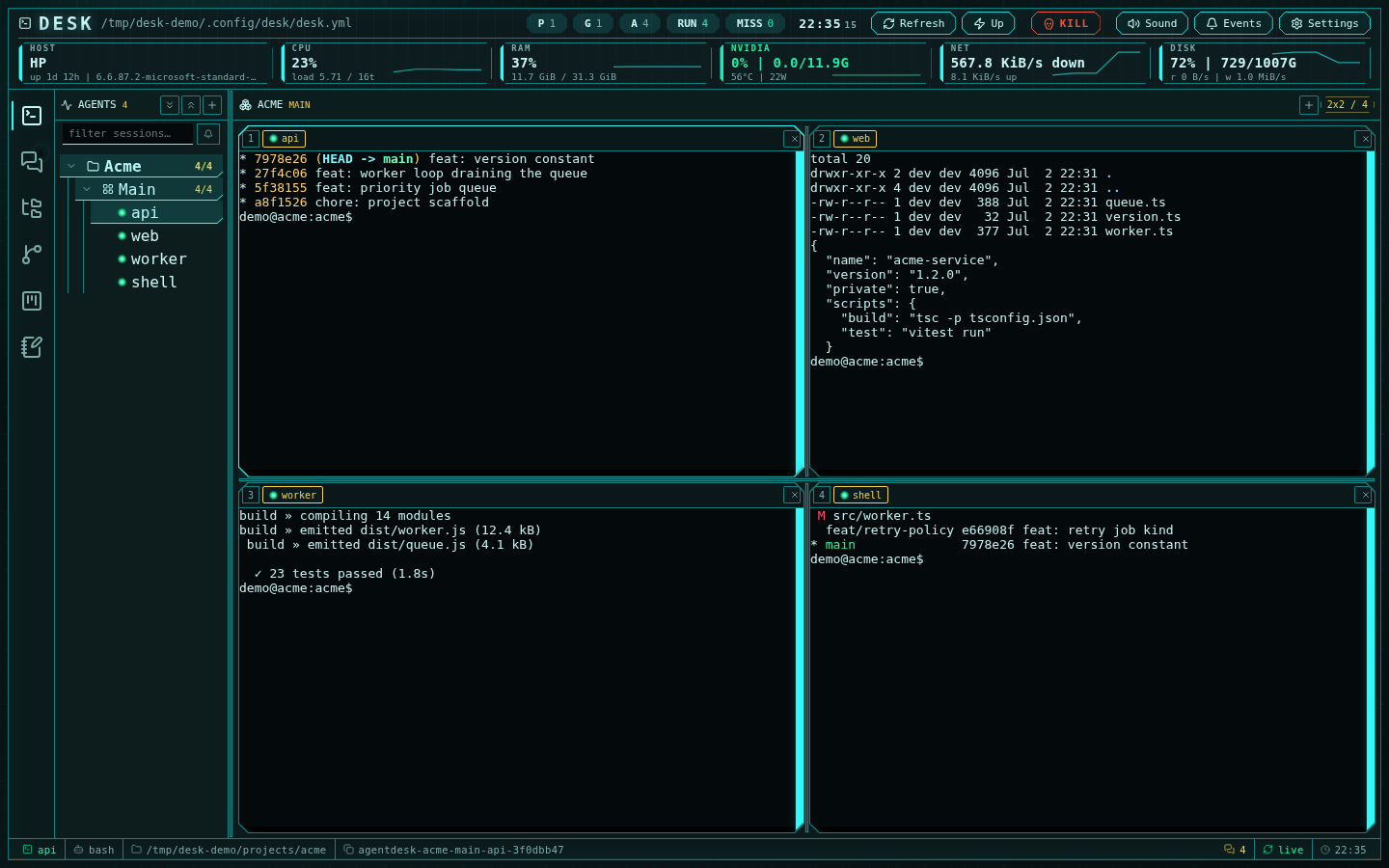
Desk is a local operator workspace for running many coding agents at once. It
keeps each agent alive in a Moor session, renders the fleet in a browser
multiplexer, and adds the collaboration and development tools you need around
those agents: channels, an IDE, LSP-backed code intelligence, Git, GitHub,
project boards, notes, and operational telemetry.
 Install Desk, start the server, authenticate agent tools, and launch your
first durable session.
Learn how Moor, the manifest, the browser, the terminal daemon, and agent
hooks fit together.
Configure projects, groups, sessions, layouts, and agent permissions for a
multi-agent workspace.
Diagnose terminal, channel, GitHub, LSP, permission, and deployment issues.
## What Desk is for
Use Desk when you want one local control room for a group of agents working
across projects, branches, terminals, files, and team-like conversations.
Desk is built for:
- **Agent operators** who need to keep Codex, Claude, OpenCode, Qwen, Kimi, Grok, shell, and
custom-command sessions alive while switching between groups quickly.
- **Repository maintainers** who want terminals, editor tabs, Git operations,
GitHub context, project boards, and notes in one browser workspace.
- **Multi-agent workflows** where agents need shared channels, mentions,
threads, delivery diagnostics, and explicit operator intervention points.
- **Remote development boxes** where code, credentials, Moor, Git, agent CLIs,
and language servers already live on the host.
## How the system is organized
Desk separates process ownership from view ownership:
- **Moor owns process lifetime.** Agent sessions keep running when the browser
closes, the network drops, or the Desk server restarts.
- **The manifest owns intent.** `~/.config/desk/desk.yml` defines projects,
groups, sessions, layouts, startup commands, permissions, and UI settings.
- **The browser owns the view.** The UI subscribes to terminals, channels,
files, diffs, project boards, notes, and telemetry without becoming the
owner of the agent process.
- **The terminal daemon owns terminal transport.** One binary browser
WebSocket multiplexes visible surfaces while the supervised daemon manages
Moor holders, generation fencing, snapshots, input, and resize.
- **Hooks own agent events.** Codex, Claude, OpenCode, Qwen, Kimi, and Grok report lifecycle,
attention, prompt, stop, and permission events back to Desk.
Read [Architecture](/concepts-architecture) and [Workspace model](/concepts-workspace-model)
before designing a larger fleet.
## Documentation map
### Start here
- [Getting started](/getting-started) walks through installation, first run,
agent authentication, session creation, and expected output.
- [Configuration](/configuration) documents the manifest and settings model.
- [Distribution and deployment](/distribution-deployment) explains source and
standalone runtimes.
### Concepts
- [Architecture](/concepts-architecture) explains the runtime components.
- [Workspace model](/concepts-workspace-model) explains projects, groups,
sessions, layouts, durable session ids, and resume ids.
- [Agents and terminals](/agents-and-terminals) covers the native chat
surface, terminal behavior, attention, rendering, and session controls.
- [Channels protocol](/channels-protocol) documents message storage, delivery,
mentions, and diagnostics.
### Guides
- [Create an agent fleet](/guide-create-agent-fleet) builds a practical
multi-agent manifest.
- [Collaborate through channels](/guide-channels-collaboration) shows the
operator and agent messaging loop.
- [Run Desk securely](/guide-deploy-securely) covers localhost defaults, SSH
tunnels to your own development box, local safety, and standalone deployment.
### Operations and reference
- [Operations](/operations) covers lifecycle, telemetry, attention, terminal
health, session controls, and the emergency kill switch.
- [Troubleshooting and FAQ](/troubleshooting) maps symptoms to checks and
fixes.
- [API and runtime reference](/api-runtime-reference), [Security and plugin
model](/security-plugin-model), [Keyboard shortcuts](/keyboard-shortcuts),
and [Release notes](/release-notes) provide operator reference material.
## First decision
Install the complete CLI, then choose a server mode:
`desk serve` launches the release-private compiled runtime and embedded UI.
Start with [Getting started](/getting-started), then read
[Distribution and deployment](/distribution-deployment) and
[Deploy and secure Desk](/guide-deploy-securely).
`desk serve --dev` explicitly starts Vite from the installed source-backed
release or a checkout. It never falls back to Bun.
Desk is local-first by default. Keep it bound to `127.0.0.1`; if you work on a
remote development box, reach it through SSH port forwarding. Read [Security and
plugin model](/security-plugin-model) before adding local runtime extensions.
Install Desk, start the server, authenticate agent tools, and launch your
first durable session.
Learn how Moor, the manifest, the browser, the terminal daemon, and agent
hooks fit together.
Configure projects, groups, sessions, layouts, and agent permissions for a
multi-agent workspace.
Diagnose terminal, channel, GitHub, LSP, permission, and deployment issues.
## What Desk is for
Use Desk when you want one local control room for a group of agents working
across projects, branches, terminals, files, and team-like conversations.
Desk is built for:
- **Agent operators** who need to keep Codex, Claude, OpenCode, Qwen, Kimi, Grok, shell, and
custom-command sessions alive while switching between groups quickly.
- **Repository maintainers** who want terminals, editor tabs, Git operations,
GitHub context, project boards, and notes in one browser workspace.
- **Multi-agent workflows** where agents need shared channels, mentions,
threads, delivery diagnostics, and explicit operator intervention points.
- **Remote development boxes** where code, credentials, Moor, Git, agent CLIs,
and language servers already live on the host.
## How the system is organized
Desk separates process ownership from view ownership:
- **Moor owns process lifetime.** Agent sessions keep running when the browser
closes, the network drops, or the Desk server restarts.
- **The manifest owns intent.** `~/.config/desk/desk.yml` defines projects,
groups, sessions, layouts, startup commands, permissions, and UI settings.
- **The browser owns the view.** The UI subscribes to terminals, channels,
files, diffs, project boards, notes, and telemetry without becoming the
owner of the agent process.
- **The terminal daemon owns terminal transport.** One binary browser
WebSocket multiplexes visible surfaces while the supervised daemon manages
Moor holders, generation fencing, snapshots, input, and resize.
- **Hooks own agent events.** Codex, Claude, OpenCode, Qwen, Kimi, and Grok report lifecycle,
attention, prompt, stop, and permission events back to Desk.
Read [Architecture](/concepts-architecture) and [Workspace model](/concepts-workspace-model)
before designing a larger fleet.
## Documentation map
### Start here
- [Getting started](/getting-started) walks through installation, first run,
agent authentication, session creation, and expected output.
- [Configuration](/configuration) documents the manifest and settings model.
- [Distribution and deployment](/distribution-deployment) explains source and
standalone runtimes.
### Concepts
- [Architecture](/concepts-architecture) explains the runtime components.
- [Workspace model](/concepts-workspace-model) explains projects, groups,
sessions, layouts, durable session ids, and resume ids.
- [Agents and terminals](/agents-and-terminals) covers the native chat
surface, terminal behavior, attention, rendering, and session controls.
- [Channels protocol](/channels-protocol) documents message storage, delivery,
mentions, and diagnostics.
### Guides
- [Create an agent fleet](/guide-create-agent-fleet) builds a practical
multi-agent manifest.
- [Collaborate through channels](/guide-channels-collaboration) shows the
operator and agent messaging loop.
- [Run Desk securely](/guide-deploy-securely) covers localhost defaults, SSH
tunnels to your own development box, local safety, and standalone deployment.
### Operations and reference
- [Operations](/operations) covers lifecycle, telemetry, attention, terminal
health, session controls, and the emergency kill switch.
- [Troubleshooting and FAQ](/troubleshooting) maps symptoms to checks and
fixes.
- [API and runtime reference](/api-runtime-reference), [Security and plugin
model](/security-plugin-model), [Keyboard shortcuts](/keyboard-shortcuts),
and [Release notes](/release-notes) provide operator reference material.
## First decision
Install the complete CLI, then choose a server mode:
`desk serve` launches the release-private compiled runtime and embedded UI.
Start with [Getting started](/getting-started), then read
[Distribution and deployment](/distribution-deployment) and
[Deploy and secure Desk](/guide-deploy-securely).
`desk serve --dev` explicitly starts Vite from the installed source-backed
release or a checkout. It never falls back to Bun.
Desk is local-first by default. Keep it bound to `127.0.0.1`; if you work on a
remote development box, reach it through SSH port forwarding. Read [Security and
plugin model](/security-plugin-model) before adding local runtime extensions.