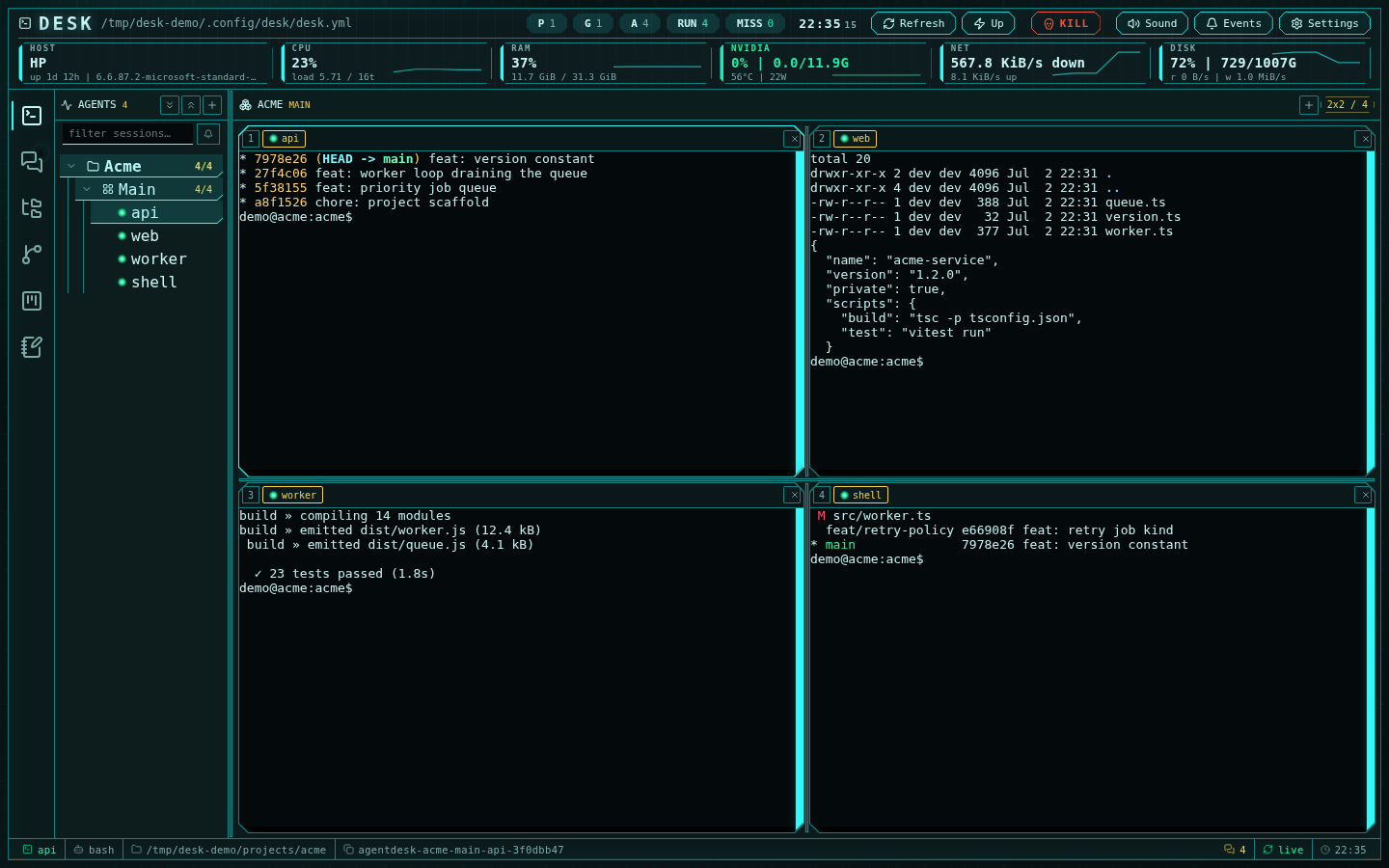
A 2x2 group of durable Moor sessions with the sidebar tree and fleet telemetry
Supported agents
Desk has a built-in integration for each of:- Claude Code
- OpenAI Codex
- OpenCode
- Qwen Code
- Kimi Code
- Grok
- bash (or any custom command)
“Integration” here, not “profile”. Profile means one thing in Desk: a named
provider account a session runs under — see
agent profiles.
--no-daemon and require a CLI version that supports
that option (the cloud image supplies Codex 0.162.0). Their provider process is
private to the Desk session, so hooks and permission settings are not inherited
from another session’s shared background server. Saving a permission change
applies it when the session is restarted or resumed.
Resume behavior is agent-specific: Claude, Codex, Qwen, Kimi, and Grok session ids
arrive through their hooks, and OpenCode sessions are recaptured from the CLI’s
session list with a picker
on restart. Every captured id is validated before reuse; an explicit resume
in the manifest works for all of them.
A new terminal-mode Codex session without a resume id starts with Hi as its
initial prompt. This starts one model turn so installed, trusted Desk hooks
can register the dialog before Channels needs to deliver its first message.
Resuming an existing dialog does not send another greeting.
Claude Code, Codex, and OpenCode sessions can render as a native chat surface
(uiMode: native); Qwen, Kimi, and Grok are terminal-only;
bash and custom-command sessions render as terminals. Each SDK-backed session
can instead run in terminal mode — the raw CLI TUI in a terminal cell — by
setting uiMode: terminal on the session, and the edit modal switches a
session between modes in place.
The native chat surface
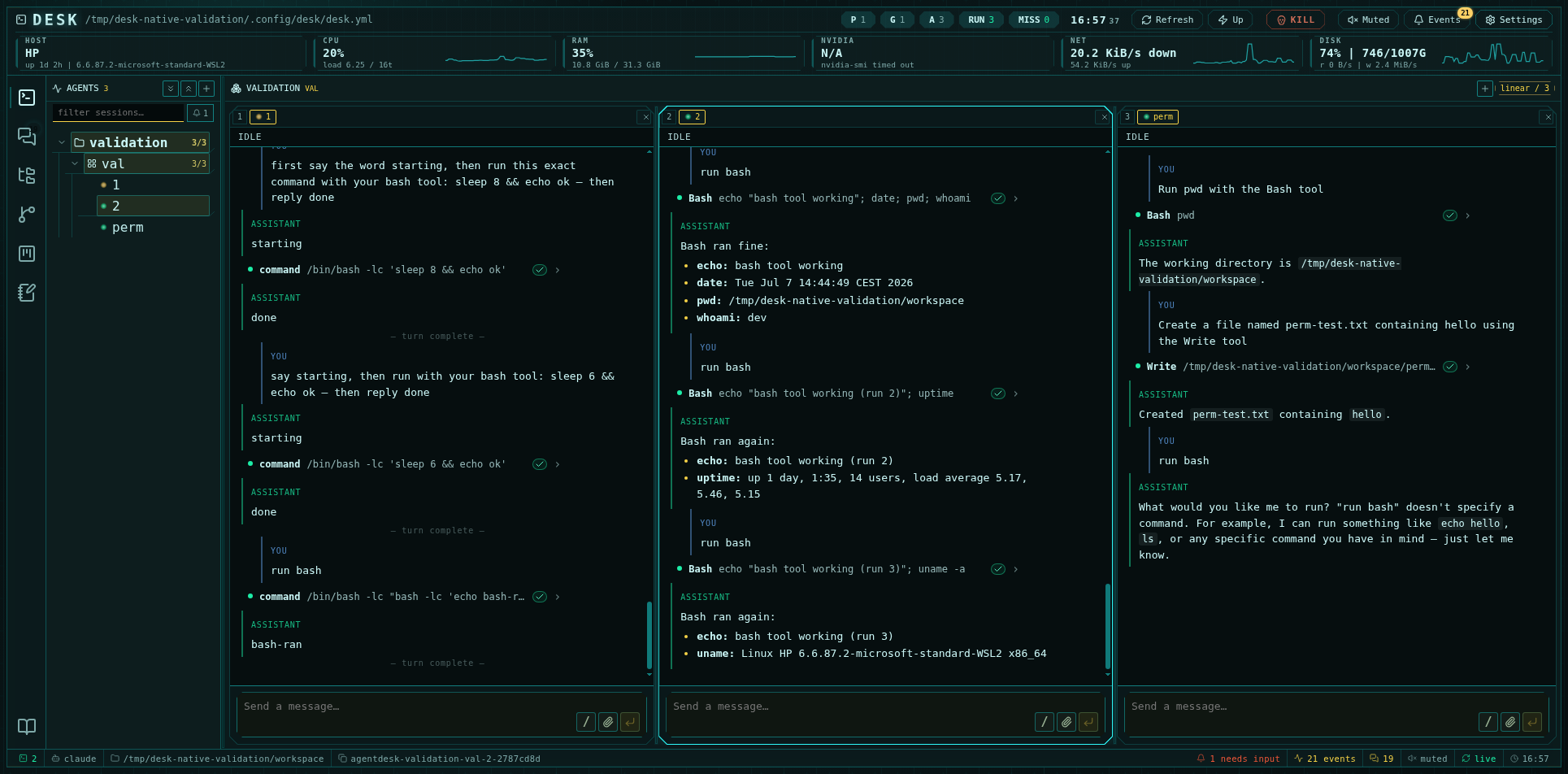
Native agent sessions: markdown transcripts, tool rows, and a composer per cell
- Transcript — the conversation reads like the agent’s own terminal
transcript: your prompts after a
❯glyph, the agent’s replies as markdown after⏺, and adone in 4.3s · 14:32line closing each turn. Long feeds are virtualized, so thousand-row histories scroll smoothly; an unread marker shows what arrived since you last looked, and a jump pill returns you to the live tail after scrolling up. Hover a row for its timestamp and the copy / create-note actions. Session status (idle, working, waiting, degraded) lives on the cell tab’s dot, whose tooltip explains why. - Tool calls — every tool invocation prints as
Name(summary)with a glyph coloured by its status, the first result lines hanging off a⎿tail, and a disclosure that opens the exact input and output the agent saw. Sub-agent activity nests under the tool row that spawned it. - Composer — a resizable input with file attachments (button, paste, or
drag-and-drop), a slash-command palette that opens when you type
/and lists the commands the agent actually advertises, and a Send control that becomes Stop while a turn runs. Picking a session in the sidebar or a cell tab puts the keyboard in its composer at once. A pulsing indicator marks the whole time the agent is working — from the moment you send until the reply, including tool execution. - Permissions — approval requests dock above the composer with the proposed command or file diff, and resolve inline.
- Continuity — transcripts survive reloads and browser switches: the server keeps the session’s event history and replays it to every surface, and the agent process itself lives in its Moor session, so nothing dies with the tab.
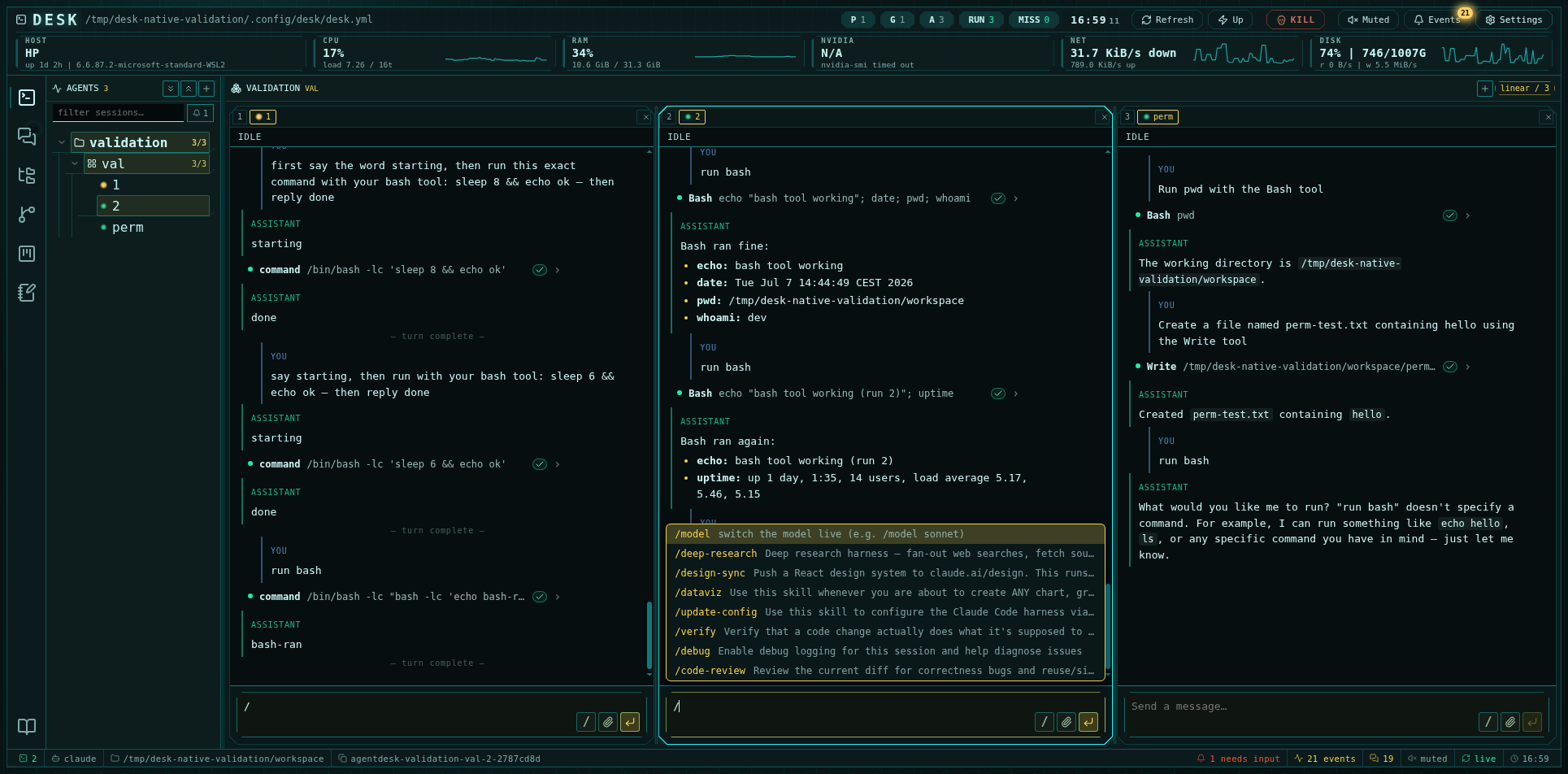
The slash palette lists the commands the connected agent advertises
Durable Moor sessions
Every managed session runs under a Moor holder keyed by its durablesessionId. This gives Desk
three important properties:
- closing the browser does not kill the agent
- restarting Desk reattaches to running work
- sessions can be captured, restarted, or booted without changing the UI model
The sidebar
The sidebar is a projects → groups → sessions tree:- Session rows show a live status lamp: running, needs input (pulsing), or missing. Attention bubbles up to collapsed group and project rows.
- Group rows show running/total counts and a boot-missing action when some sessions are down.
- A filter row narrows the tree by session, group, or project substring, and a needs-input chip filters to sessions waiting on you, with a count.
- Projects, groups, and sessions reorder by drag and drop, and a session can be dragged into another group to move it. Order persists to the manifest.
- Row actions cover add, edit, info, kill (confirmed first — stops the agent process and leaves the session in config, so Boot brings it back), restart (with confirmation — it kills the running agent), and delete.
Groups and layouts
Groups organize agents by project, lane, or responsibility. Layout kinds are1x1, 2x2, 3x3, 4x4, linear (all cells in one row), and custom,
with 1–16 cells. The layout badge in the multiplexer header switches kinds
in place; +/− buttons add and remove cells.
Cells are resizable: drag the separators and the split proportions persist per
group in the manifest, restoring exactly after a reload. Sessions map to cells
by assignment — drag a session tab onto a cell, or tap an empty cell to assign
one from an inline picker.
Group switches are cheap by design: recently visited groups stay mounted with
live cells (a warm budget of roughly 40 sessions on desktop), so flipping
between groups opens no new connections and loses no transcript or terminal
state.
Terminal rendering
Terminal cells — bash sessions, custom commands, and SDK agents running withuiMode: terminal — use xterm.js in the browser and a server-side terminal
daemon for transport. One binary WebSocket per browser tab carries the tab’s
terminal surfaces. A hidden surface keeps its channel but relinquishes input,
resize, and output-delivery authority until reveal. The daemon owns the Moor
holder connections, fans each session to every viewer (a desktop tab and a
phone see the same process), retains one bounded shared output suffix, and
catches a same-channel reveal up with one contiguous packet when its cursor and
geometry revision are still valid. A gap or revision change falls back to a
current-screen snapshot; retained history remains available through the frozen
scrollback viewer. Output streams only to visible cells. Unsubscribe is reserved for actual
surface removal or transport loss. SUBSCRIBE carries the fitted geometry for
new and reconnected channels; later RESIZE frames are sent and applied only
when that geometry changes, so revealing a cell cannot advance the terminal
revision solely because its layout observer repeated the same dimensions.
Rendering uses hardware WebGL where available, under a shared budget of 8
contexts — cells beyond the budget (and machines with software-only GL) fall
back to the DOM renderer. Hidden cells release their context to visible ones,
and only the focused cell blinks its cursor.
File paths printed by an agent are links: click one to open it in the editor.
Relative paths resolve against the folder the session was launched in (a cd
inside the session is not tracked), and a guessed path that is not on disk is
refused with one notice instead of opening.
Scrollback: append-style agent output scrolls natively in the live buffer,
which already carries the daemon’s retained history (colors and layout
preserved, native scrolling and selection); full-screen TUI programs get
application-owned scrolling with agent-aware key encoding. A custom scroll
rail on the cell edge tracks position — except on Grok panes, whose TUI draws
its own scrollbar, so Desk’s rail steps aside instead of competing with it.
Terminals self-heal: if the connection drops, cells show a reconnect overlay
and automatically re-arm on tab return, network recovery, or the first
successful poll after an outage — waking a laptop reconnects the whole wall
without a click.
Attention signals
Session state comes from the agent itself. Desk installs lifecycle hooks into each supported CLI, and those hooks post typed events — turn opened, turn finished, tool started, tool ended, permission requested — to the daemon, which owns one canonical state per session. Native-mode sessions report the same facts through the SDK. Desk does not read the terminal to work out what an agent is doing, and a session whose hooks have not fired reads as unknown rather than being guessed at. That state surfaces as:- a pulsing lamp on the session row and its collapsed ancestors,
- an entry in the events drawer with kind filters, unread tracking, and mark-all-read,
- an attention sound (respecting the mute toggle).
If a session sits on
unknown, run desk hooks install and restart it — hooks
are read at launch, so a session started before they existed never reports.Command palette and keyboard
Ctrl+K opens the session quick-switcher — attention-needing sessions first,
then recent, then tree order, fuzzy-matched across session, group, project,
and session ids. Ctrl+Shift+K opens it even while a terminal has focus; on
macOS ⌘K does both, since ⌘ with a letter never reaches the shell.
Ctrl+Alt+1..9 focuses cell N; Ctrl+Alt+←/→ cycles sessions tree-wide.
See Keyboard shortcuts for the full map, including
in-terminal copy, paste, and find.
The header
The header carries fleet stats (project/group/agent counts, RUN and MISS chips — MISS is clickable and boots the missing sessions), host telemetry cells with sparklines (CPU, RAM, GPU, network, disk), a clock, and the toolbar: Refresh, Up (start all missing), the emergency kill switch, sound toggle, events drawer, and settings. The config-path button opensdesk.yml
directly in the editor. On phones the toolbar collapses into a burger menu
and telemetry into a compact strip.
Mobile
Below 860 px the active subsystem owns the screen: sidebars become slide-over drawers with a tap-to-close scrim, and the multiplexer becomes a swipeable one-cell-per-screen pager whose indicator diamonds are state-tinted — the active cell expands into a named pill, and attention pulses so you can see who is screaming from the pager alone.Operational controls
- Refresh re-reads fleet state; a 2-second pulse keeps liveness, attention, and telemetry current in between (paused while the tab is hidden), so an externally killed session flips to missing within a tick — no manual refresh.
- Up starts every missing session from the manifest without touching
running ones, including explorer terminals opened from the editor tree (a
terminal whose folder no longer exists is skipped);
desk upprints the booted/skipped counts, the Up button in the UI does not currently surface them. Groups and individual cells have their own boot actions. - Kill stops one session’s agent process (confirmed first) without touching its config entry; the cell shows it as missing with a Boot button.
- Restart kills and relaunches one session (confirmed first).
- KILL is the emergency stop: it retires every configured Moor session and explorer terminal, then kills every agent CLI process found by the host sweep — every provider in the agent registry (Codex, Claude, OpenCode, Qwen, Kimi, Grok), including processes Desk did not start. It confirms with an alarm before acting. Use it as a last resort, not a routine control.