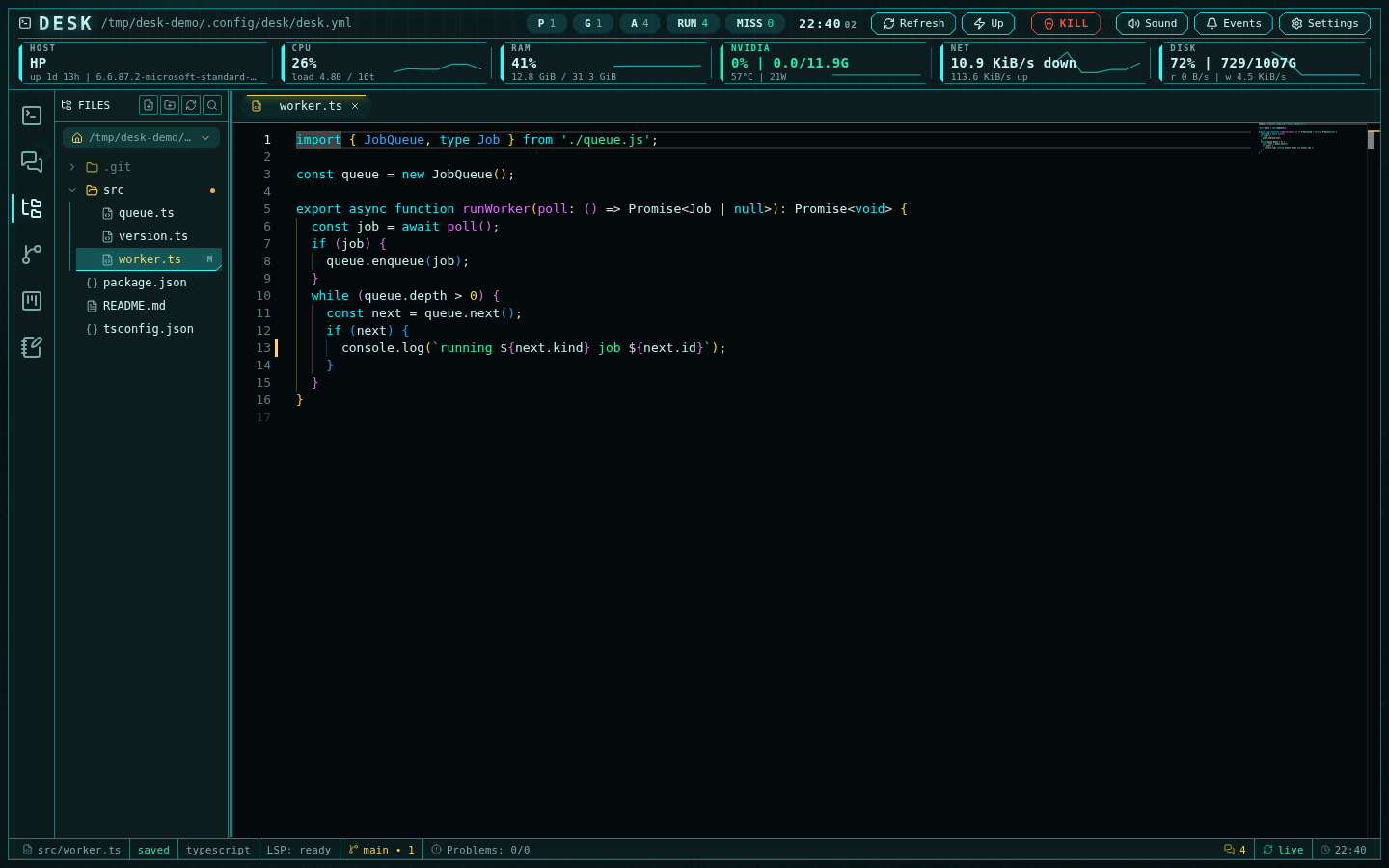
The editor with a TypeScript file open: git-aware explorer, LSP ready, zero problems
File explorer
The explorer provides root switching (typed path, home, or configured shortcuts), lazy folder expansion, hidden-file visibility, drag-and-drop moves, live filesystem updates, and full file operations: create, rename, move, duplicate, copy/paste (with a clipboard shared with notes), and delete. Path resolution is root-fenced server-side so the explorer can never escape its root. Switching root — through the picker, or by opening a file that lives under a different root — closes every tab from the previous root, confirming first if any of them is unsaved. When language servers are running, file operations become transactional previews: renaming a file first asks the language server what references it would update, shows the affected files and any create/rename/delete side effects in a dialog, and applies everything server-side as one unit — with a dirty-file block before apply and rollback on failure. Without a relevant server the operation is a plain filesystem op. The explorer is also git-aware: files carry VS Code-style status badges and tints, ancestor directories show change dots, and repository roots grow a branch chip with ahead/behind arrows and the change count. The file context menu includes stage/unstage, discard (confirmed), open diff, per-file history, and copy GitHub URL.Monaco editor
Files open in Monaco tabs with syntax highlighting, multi-cursor editing, minimap, tab restoration across reloads, and drag-reorderable tabs with close/close-others/close-all. Saving is mtime-guarded: if the file changed on disk under you, a conflict banner offers reload or keep-mine instead of silently overwriting. Files over 2 MB and binary files open read-only. Autosave has three modes — off, after-delay (configurable), and on-focus-change — and is strictly weaker than manual save: it never writes over a conflict, a deleted file, or a read-only view. A git gutter shows added/modified/deleted line bars against HEAD, refreshed on save, filesystem events, and any git action. The status bar carries the file path (click to copy), save/conflict state, language, cursor position, branch chip, and problem counts.Ctrl+P opens quick-open — fuzzy filename search with per-root recent files —
and the search panel covers workspace-wide filename and content search
(ripgrep-backed), opening results at the matching line.
Non-text files open in viewers: images with zoom, PDFs, and markdown with
live-preview rendering — GitHub-flavored tables, KaTeX math, Mermaid
diagrams, and highlighted code. Tabs toggle between source and rendered
views.
Problems panel
A collapsible bottom panel aggregates diagnostics for the files you have open (never a global sweep of the whole workspace), grouped per file with severity counts in the status bar. Clicking a problem jumps to its location.Terminals panel
Right-click a folder, or the empty tree background for the editor root, and choose Open in terminal (never on a file). A form asks for a Name, the Directory (prefilled with the folder), and a Command, like the add-session form for abash agent. Leave the command
empty to get your $SHELL; otherwise Desk runs that command in the directory,
and runs it again whenever the terminal boots. The shell starts through the
terminal daemon, like a bash agent session, but it is not an agent session:
it never shows in the agents sidebar or grid.
Terminals is a second bottom panel with the same look and drag handle as
Problems; one bottom panel is open at a time. Dragging its resize handle below
the minimum height closes it, matching Problems. Like Problems, it is scoped
to the editor root: the status-bar button, Terminals: <running>/<total> to
the right of Problems, appears while the root has at least one terminal, and
the panel lists every terminal under the root as tabs in a column on the
right, sorted by folder, like the terminal tabs in VS Code. A tab shows the
terminal’s name with a liveness dot, and its folder relative to the root plus
its command when set underneath; the active tab is bold with an accent bar,
and the live terminal fills the rest of the panel. With a single terminal the
column is hidden and that terminal’s name sits in the panel header instead.
+ opens the same form prefilled with the editor root’s directory. Hovering
or keyboard-focusing a tab reveals its ⋯ button (always visible on a touch
device, with no hover to trigger it); the single-terminal header’s ⋯ is
always visible, next to the name. Right-clicking a tab opens the same menu,
with the actions an agent session has: Terminal
info shows the entry, Edit reopens the form with the current name,
directory, and command, Restart retires the shell and starts it again,
and Delete retires the shell and forgets the entry after a
confirmation. Saving an edit keeps the id; it restarts a
running shell only when the directory or the command changed, so a rename
never interrupts the session. The panel header’s Delete all terminals in
this project action retires and forgets every terminal under the root at
once, after a confirmation; an entry whose shell refuses to stop stays listed
and the refusal is reported.
A page reload reconnects with scrollback, and a Desk restart re-adopts live
shells together with agent sessions. After a machine reboot entries show
missing under the same Boot session overlay agent cells use; Up boots
them alongside agent sessions (a terminal whose folder no longer exists is
skipped), and the kill switch retires them. Entries persist in
settings.explorerTerminals.
Language servers
LSP support is off by default; enable it in Settings → Language servers or withsettings.lsp.enabled: true in the manifest. Once enabled, Desk detects
the languages present under the editor root and starts matching servers on
demand; the per-language toggle in settings is a denylist — detection is
authoritative, you can only subtract from it.
Built-in server integrations:
- TypeScript / JavaScript —
typescript-language-server(bundled) - Python — Pyright (bundled)
- Rust —
rust-analyzer, downloaded automatically at a pinned release with SHA-256 verification and cached under~/.cache/desk/lsp
settings.lsp.serverCommands. Sessions are warmed at server start for the
configured root, so the first file you open usually finds its server already
indexed. The editor status bar tracks the lifecycle: warming, indexing (with
progress), ready, degraded (falling back to Monaco’s built-ins), restarting,
or stopped. Crashed servers restart under a bounded supervisor rather than
flapping forever.
Editor features are capability-gated per server: diagnostics (push and pull),
completions, hover, go to definition/type/implementation/references, document
symbols and highlights, rename, formatting (document, range, and on-type),
code actions, code lens, signature help, folding, selection ranges, inlay
hints, semantic tokens, document links, and colors. Monaco’s built-in
TypeScript diagnostics are disabled while a real server owns the language, so
you never see duplicate or contradictory squiggles. Burst-prone requests are
scheduled adaptively so a slow server never floods.
MCP surface for agents
Managed Claude Code, Codex, and Qwen sessions can receive the same language intelligence throughdesk-lsp-mcp, Desk’s MCP server (enabled by
settings.lsp.agents.enabled). It exposes 18 read-only tools:
lsp_hover, lsp_definition, lsp_references, lsp_type_definition,
lsp_implementation, lsp_declaration, lsp_document_symbols,
lsp_document_highlights, lsp_completion, lsp_signature_help,
lsp_code_actions, lsp_format, lsp_prepare_rename, lsp_rename,
lsp_folding_ranges, lsp_selection_ranges, lsp_semantic_tokens, and
lsp_diagnostics.
The surface is deliberately data-only: lsp_rename returns the workspace
edit as data without applying it, and code actions are stripped of executable
commands. Each agent session gets its own bearer token bound to its working
directory — requests outside that root are rejected, responses are redacted
of environment and configuration details, and per-session request caps keep
one agent from starving the server. Agents share the same language-server
processes as the editor, so both always see one consistent view per project.
Editor and terminal integration
The editor is connected to the rest of Desk:- channel file links open in the editor, deriving and switching roots when needed
- file paths in terminal and native agent output are clickable and open in
the editor too (relative paths resolve against the folder the session was
launched in;
path:line:collands on that position) - the explorer’s context menu downloads the selection: one file as itself,
several files or a folder as a
.zip - the explorer’s folder menu opens a shell in that folder (Open in terminal), shown in the Terminals panel
- git diffs open as Monaco diff tabs in the source-control subsystem, and “reveal in explorer” navigates back
- terminal selections become notes via the right-click menu
- the manifest (
desk.yml) opens directly from the header’s config button