Give each session its own provider account: create profiles, assign them, and understand what moves with a profile and what does not.
One machine, several accounts. A work Claude account and a personal one; a
Codex account per client; a shared team account you keep away from your own.
Without profiles every agent Desk launches uses whichever account that CLI
happens to be logged into — so the answer to “which account is this agent
spending?” is “the last one I logged in as”, for all of them at once.A profile is a named provider account. Assign one to a session and that
session runs as that account, whatever the others are doing.
Desk does not hold your credentials or log in on your behalf. It points the
agent CLI at a directory of its own:
~/.config/desk/profiles/<profile-id>
for CLAUDE_CONFIG_DIR (Claude Code), CODEX_HOME (Codex), or
PI_CODING_AGENT_DIR (Pi). The CLI then
authenticates into that directory exactly as it would into ~/.claude or
~/.codex, and writes its own credential files there. Desk creates the
directory 0700. Credentials stay owned by the CLI. Desk merges its telemetry
hooks; Skills selection is independent of this account directory.A profiled launch also unsets inherited provider credentials —
ANTHROPIC_API_KEY and friends — so an ambient key in your shell cannot
silently outrank the account you picked. Choosing a profile means choosing it.
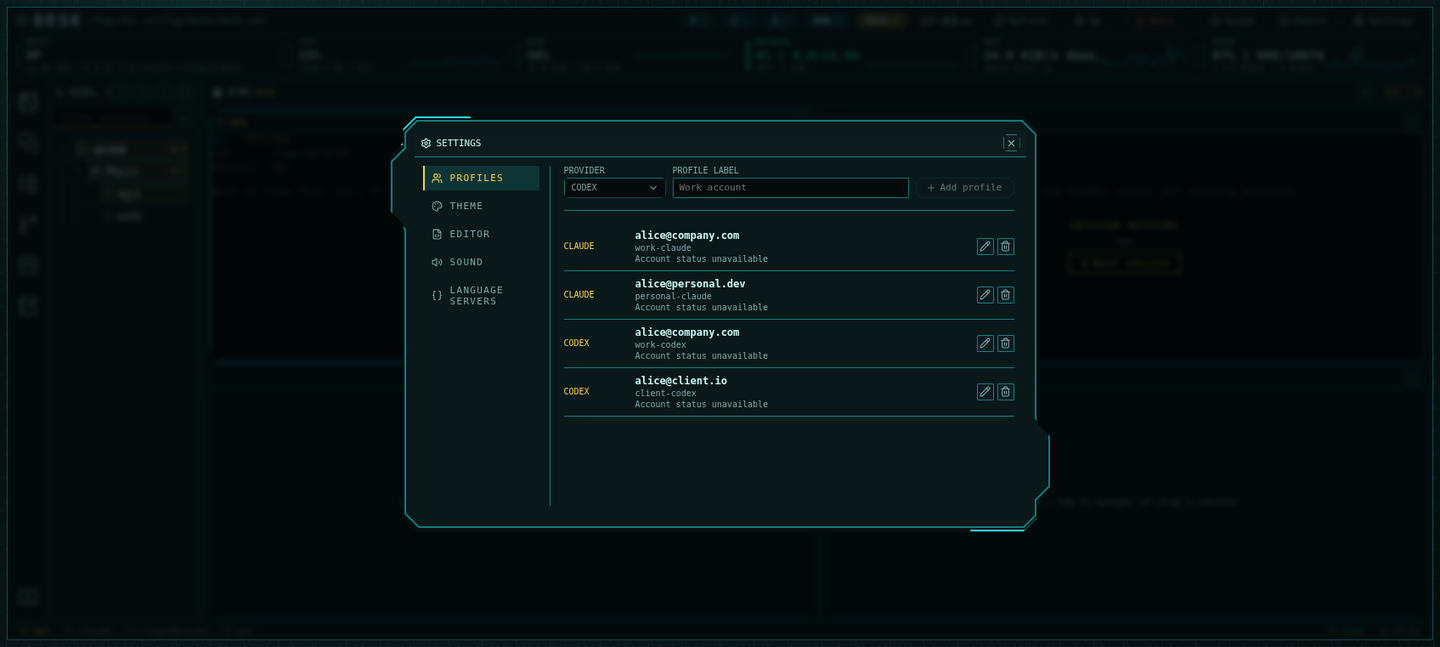
The gear icon in the toolbar. Profiles is the first section.
The Profiles settings panel: one row per provider account
2
Add the account
Pick the provider (claude, codex, or pi) and give it a label you will
recognise in a dropdown — an email address works well. Desk mints the id
from the label.
3
Sign in inside the profile
A new profile is empty: it has no credentials until the CLI writes some.
Assign it to a session, start that session, and log in there. An ambient
login in your own terminal does not carry over — that is the point.
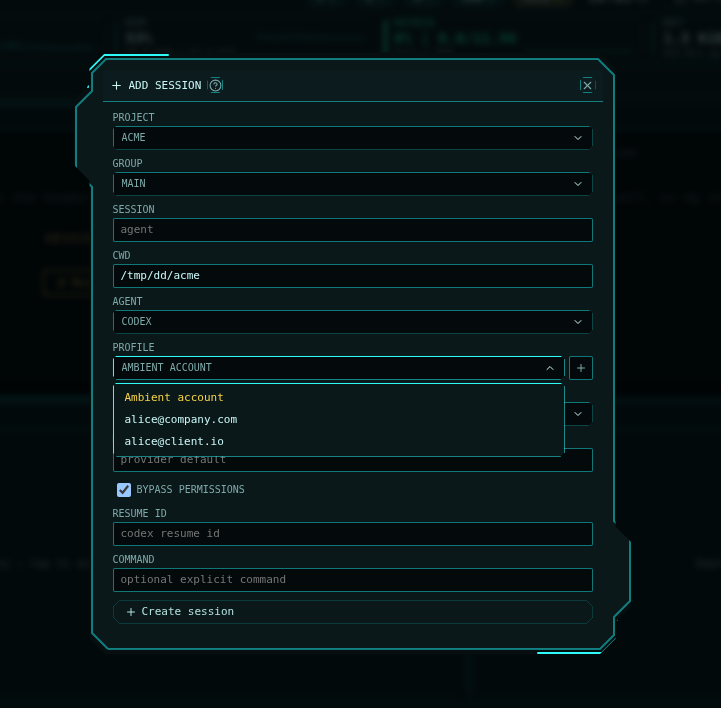
You can also create one without leaving the session form: the + beside the
Profile picker opens Settings and brings you back with what you had typed
still in place.
In Add session or Edit session, the Profile row sits directly under the
agent picker:
The session form: the Profile picker lists only accounts for the chosen agent, and + creates one without losing the form
Ambient account — the default. The CLI uses whatever it is logged into.
A named profile — the session runs as that account.
The picker only offers profiles whose provider matches the session’s agent; a
Claude session cannot be pointed at a Codex account. In the manifest the field
is profileId, and a mismatch is a manifest error rather than a quiet
fall-back to ambient — see Configuration.
Settings → Desk Skills contains the Desk default and one table of current
projects and agents. Projects and agents choose Inherit, On, or Off;
the nearest explicit choice wins: agent, project, Desk. The default is Off.
The account profile does not change this choice. Synthetic CWD groups without
a stored project inherit the Desk default directly. Custom commands retain
exactly their authored command; configure their plugins in that command.Save applies the selected preferences together. After saving, Desk offers to
restart only running agents whose effective choice changed. Later leaves
those agents running; their choice applies on the next launch. Restart interrupts
the current turn and uses the saved resume identity. A failed restart remains
visible without repeating the successful restarts. Turning Skills off cannot
erase instructions already present in a conversation.Claude receives the local plugin path on its CLI or SDK launch. Codex receives
per-launch plugin configuration and a provider-produced cache entry, prepared
only if the selected package is missing. No Skills CORE block or hook group is
written to the user’s AGENTS.md, CLAUDE.md or shared hook configuration. Existing
user plugins and Desk telemetry are preserved. Two agents sharing an account
can select different Skills settings.The plugin supplies CORE, skills and two lifecycle hooks. Python 3 is required
for those hooks. Hook trust stays with the client: Codex may show its normal
hook review at the first terminal launch. Native Codex requires that review
in a terminal of the same account before it can deliver the hooks; otherwise
it reports a concrete startup error without a model request. Desk does not
approve hooks automatically. Claude uses its normal workspace trust flow.The shipped package is pinned. Runtime copies live under Desk’s versioned data
cache so existing launch paths are retained across an application update.
Codex selects the active installed version using its own plugin rules; a
provider reload may pick up an update. There is no runtime package hashing,
background reconciliation or forced restart to apply a new package.
The third row is the one that surprises people. Claude Code keeps its
conversation history inside its config directory, so a session’s transcripts
live in whichever profile it ran under.
Changing a live session’s profile points it at a different history. The
conversation it was resuming is still on disk under the old profile, but
--resume will not find it from the new one, and the session starts fresh.Decide the account before a long conversation, not during one.
~/.config/desk/profiles holds real credentials. A backup that copies
desk.yml, channels, and notes but skips it restores a workspace whose
agents are all logged out. Back up the whole of ~/.config/desk — see the
backup answer.
The agent asks me to log in again after I assigned a profile. Expected: a
fresh profile has no credentials. Log in inside that session once.My conversation disappeared after switching profiles. It did not — it is
under the previous profile’s directory. Switch the session back to that
profile to resume it, or start a fresh conversation under the new one.The profile picker does not show my account. Its provider must match the
session’s agent. A profile created as codex never appears on a Claude
session.