git and gh commands. It does not bundle its own Git implementation, and it does not store separate Git credentials.
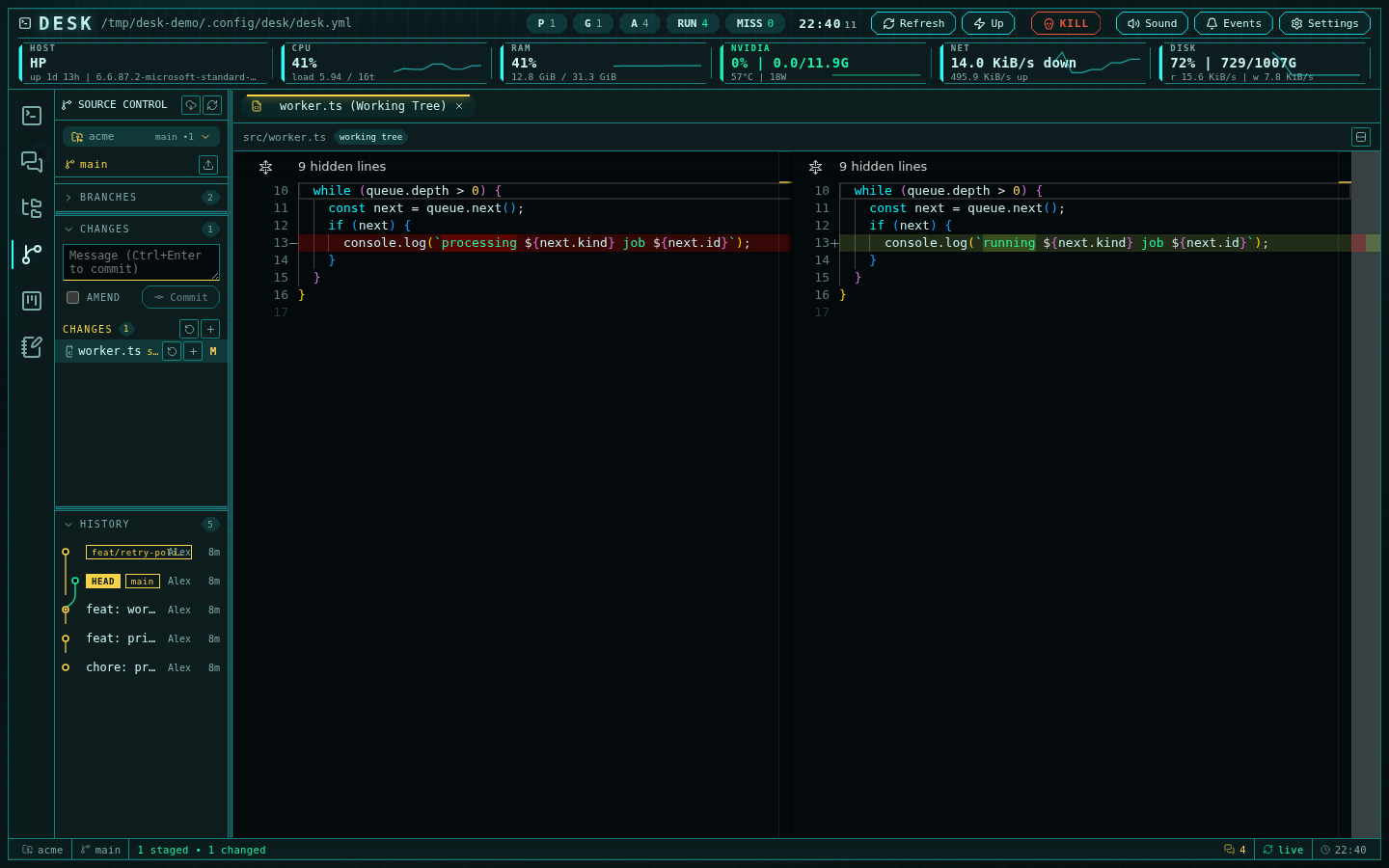
The source-control rail: staged changes, lane-colored history, and a side-by-side working-tree diff
Repository discovery
Desk scans under the active editor root and shows a searchable repository picker. Discovery is intentionally bounded:- maximum scan depth: 4
- maximum repositories: 200
- skipped directories include
node_modules,.git,.hg,.svn,.venv,venv,__pycache__, and.cache
Changes
The Changes view shows:- staged files
- unstaged files
- untracked files
- conflicted files
- ahead and behind counts
- publish state for branches without an upstream
GIT_OPTIONAL_LOCKS=0 so status polling does not contend with agents or editors that are also using Git.
Commits
The commit box supports normal commits and amend:amend is checked, an empty message keeps the previous commit message. Commit operations use the selected repository and the state shown in the rail.
Sync operations
Desk exposes four sync actions:fetchpullpushpublish
pull uses a fast-forward-only workflow. publish pushes the current branch and sets its upstream.
History
The History view shows a commit graph with branch, tag, and HEAD markers. Each commit can expand to changed files and open Monaco diffs. Commit context actions include:- create a branch at the commit
- copy the SHA
- copy the commit message
- open the commit on GitHub when
ghcan resolve the repository - revert the commit
Branches and worktrees
The Branches view supports:- checkout of local branches
- checkout of remote branches
- branch creation
- branch deletion
- copying branch names
- opening existing worktrees as the active repository
- removing non-main worktrees
- copying worktree paths
Branch comparison
Desk compares branches without checking them out. It computes a merge base and opens the diff against the current repository. If histories are unrelated, Desk falls back to an empty-tree diff rather than mutating the worktree.Diffs
Diffs open as Monaco diff tabs. Supported diff modes include:- worktree changes
- index changes
- a single commit
- a commit range
- branch comparison
- per-file line diffs used by the editor gutter
Explorer integration
The editor explorer uses Git status maps for visible paths. Directories can show status dots when descendants are changed, and files can open their line diffs from the editor gutter. Git and editor navigation work both ways:- reveal a Git file in the editor explorer
- open a file from a diff
- jump from an editor file to Git history or changes
GitHub context
Whengh is authenticated, Desk can show GitHub repository metadata and pull request context for the current branch.
This is a view and navigation surface. Desk does not create, merge, or review pull requests from this page.
Operations degrade when gh is missing, unauthenticated, or cannot resolve the repository.
Next steps
- Use GitHub Projects for Projects v2 boards and tables.
- Use Troubleshooting and FAQ when GitHub context or project data does not load.
- Return to Create an agent fleet when you want agents, shells, and Git workflows grouped by project.